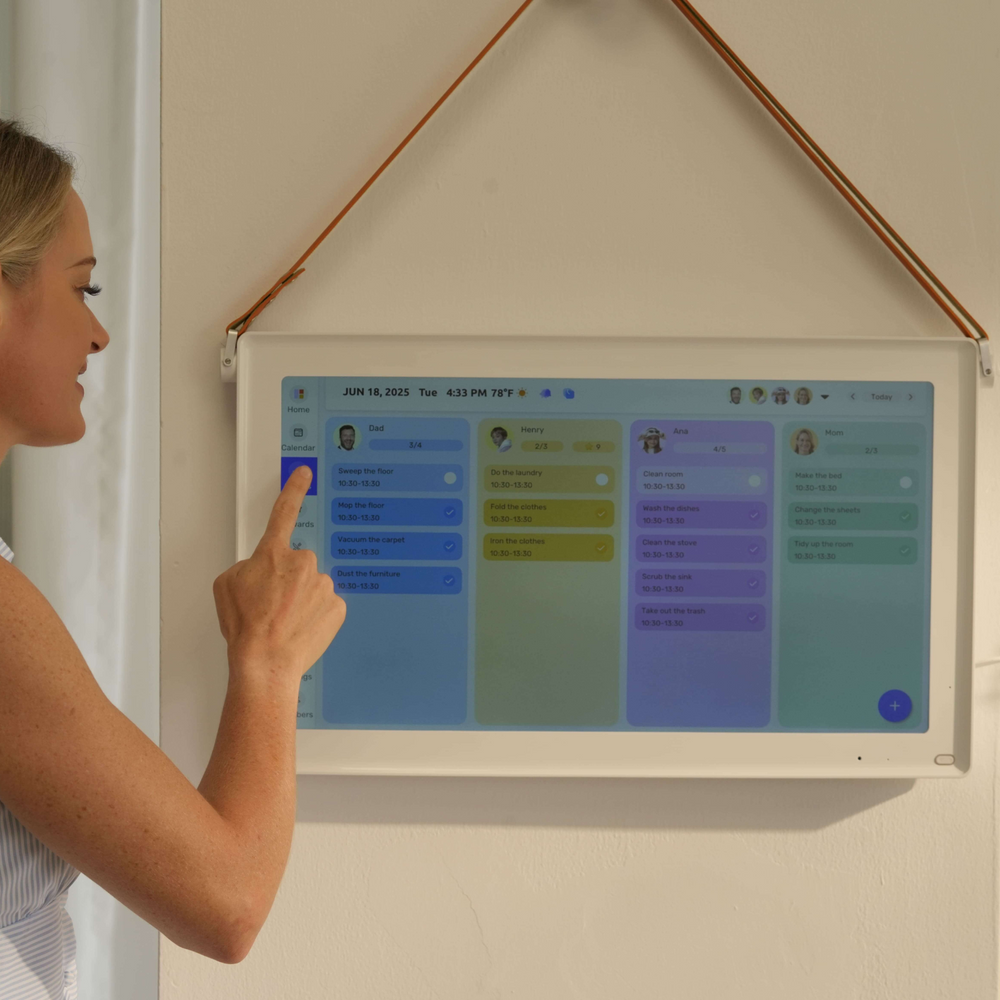
It’s 7:45 AM, and the kitchen is already in chaos. One child can’t find their permission slip, another just remembered a soccer practice that conflicts with a dentist appointment, and nobody knows what’s for dinner tonight. Sound familiar? For most families, this kind of morning isn’t the exception — it’s the routine.
The root of the problem is rarely a lack of effort. Parents juggle work calendars, school schedules, extracurricular activities, and meal planning across sticky notes, whiteboards, and half a dozen apps that never quite talk to each other. The result is a constant game of catch-up, with important details slipping through the cracks.
A large digital calendar offers a modern answer to this all-too-common struggle. Mounted in a central location like the kitchen or hallway, it becomes a living, breathing hub for everything your household needs to function smoothly. Concepts like the digital fridge calendar that are different from the printable calendar and the family command center take this idea even further, transforming a single display into a complete organizational system. This article walks you through practical, actionable steps to set one up — and finally bring calm to the daily chaos.
Why Families Struggle with Organization and the Need for a Centralized Solution
Most households run on a patchwork of systems that were never designed to work together. Paper calendars on the fridge capture some appointments but miss others. Individual phone apps keep each parent informed about their own commitments while leaving the rest of the family in the dark. Group chats fill up with scheduling updates that get buried under memes and unrelated conversations. The result is a communication gap that shows up at the worst possible moments — a forgotten pickup, a double-booked Saturday, or the familiar 5 PM question: “What’s for dinner?”
Meal times are where the disorganization hits hardest. Without a clear weekly plan visible to everyone, families default to last-minute decisions that cost both time and money. Weeknight dinners become stressful rather than restorative, and grocery runs happen reactively instead of strategically. These aren’t signs of a disorganized family — they’re signs of a system that hasn’t caught up with the complexity of modern household life.
A large digital calendar addresses this directly by functioning as a true scheduling tool for the entire household. Rather than each person maintaining their own silo of information, a shared display in a high-traffic area — the kitchen, the hallway, the entryway — makes everyone’s commitments visible at a glance. When the whole family can see the same real-time information, coordination becomes a conversation rather than a crisis.
Understanding the Large Digital Calendar: Features and Core Benefits
A large digital calendar is exactly what it sounds like — a high-visibility display, typically wall-mounted or positioned on a countertop, that serves as a shared scheduling hub for everyone in the household. This can take the form of a dedicated smart display like an Amazon Echo Show or Google Nest Hub, a repurposed tablet mounted near the kitchen, or even a smart TV running a calendar app in a common area. Unlike a paper calendar tucked to the side of the fridge, a digital display is dynamic, always current, and visible from across the room.
The contrast with traditional methods is immediate. Paper calendars can’t send reminders, don’t sync with your phone, and require someone to physically update them — a task that inevitably falls behind. Individual phone apps solve the sync problem but create a new one: the information stays private, invisible to the rest of the family. A large digital calendar bridges both gaps at once.
The core benefits come down to four things. First, high visibility means every family member — including kids who don’t carry phones — can check the day’s agenda without asking anyone. Second, real-time updates ensure that when a practice gets rescheduled or a meeting runs late, the change appears immediately for everyone. Third, device accessibility lets parents update the calendar from their phones while the display reflects those changes instantly at home. Fourth, app integration connects the calendar to tools like Google Calendar, Apple Calendar, and meal planning apps, turning it into a true family command center rather than just a scheduling tool. Together, these features make the large digital calendar one of the most practical upgrades a busy household can make.
Step-by-Step Guide to Setting Up Your Digital Fridge Calendar
Getting a digital calendar up and running in your home doesn’t require technical expertise — it requires a clear starting point and a plan that the whole family can get behind. The setup process breaks down into three phases: picking the right hardware and software, configuring everything for your household, and building habits that keep it useful long-term.
Choosing the Right Hardware and Software for Your Home
Your first decision is the display itself. A dedicated smart display like an Amazon Echo Show 15 or Google Nest Hub Max works well if you want voice control and built-in app ecosystems. A repurposed tablet — an older iPad or Android device mounted with an adhesive wall bracket — offers more flexibility at a lower cost. Some modern smart fridges include built-in screens, which eliminate the need for a separate device entirely. For software, prioritize apps with genuine family-sharing features: Google Calendar supports multiple accounts with color-coding, Cozi is designed specifically for household coordination, and platforms like Everblog offer purpose-built digital calendar experiences designed with household visibility in mind. Whichever combination you choose, make sure it supports meal planning integration or connects easily to apps like Mealime or Paprika.
Initial Configuration and Family Onboarding
Once your hardware is mounted and your app is installed, create individual profiles for each family member and assign a distinct color to each person. Sync existing personal calendars — work schedules, school portals, and sports apps — so the display pulls everything into one view automatically. Keep the main screen uncluttered: a weekly view showing names, events, and meal slots is easier for kids to read than a dense grid. Introduce the calendar at a family meeting, let each child add one upcoming event themselves, and explain what the colors mean. Ownership drives adoption.
Maintenance and Daily Usage Tips
Consistency is what separates a useful calendar from an abandoned one. Set aside ten minutes every Sunday to review the coming week together — confirm appointments, fill in dinner plans, and flag any conflicts before they become surprises. Enable push notifications on each parent’s phone so schedule changes appear on the display and in your pocket simultaneously. Encourage kids to add their own events, whether it’s a school project deadline or a friend’s birthday. Giving them edit access builds responsibility and keeps the calendar accurate without putting the entire burden on one parent.
Integrating Meal Planning into Your Digital Schedule for Efficiency
Meal planning is where a large digital calendar earns its keep beyond basic scheduling. When dinner decisions live on the same screen as soccer practice and dentist appointments, the whole week comes into focus at once. You can see immediately that Tuesday is a late night and plan something quick, or that Sunday is open and worth trying a new recipe. That kind of at-a-glance awareness turns reactive, stressful evenings into something manageable.
Creating a Weekly Meal Plan Template on Your Calendar
Start by building a recurring weekly template with dedicated slots for breakfast, lunch, and dinner on each day. Most calendar apps let you create repeating events — use these as placeholder blocks that you fill in during your Sunday planning session. Assign a distinct color to meal entries so they stand out visually from appointments and activities. Factor in your family’s rhythm: on days packed with after-school commitments, slot in 20-minute meals or slow cooker options planned in advance. If anyone has dietary restrictions or preferences, note them directly in the event description so whoever is cooking has everything they need without hunting for details. Apps like Cozi and Google Calendar both support this kind of structured templating, and some meal planning apps like Mealime allow you to export planned meals directly into your calendar as events.
Syncing with Grocery Lists and Automated Reminders
The real efficiency gain comes when your meal plan connects to your grocery list automatically. Apps like Paprika and Mealime generate ingredient lists directly from the recipes you schedule, eliminating the manual step of writing out what you need. Link these apps to your calendar so that when a meal is scheduled, the ingredients populate a shared shopping list accessible to everyone. Set a recurring reminder — Thursday evening works well for most families — to review the list and place an online grocery order or plan a store run before the weekend. Add prep reminders too: a notification the morning of a recipe that needs marinating time or a slow cooker start keeps dinner on track without anyone having to remember independently. This connected system turns meal planning from a chore into a largely automated process.
Elevating Organization: Building a Family Command Center Around Your Calendar
A large digital calendar becomes exponentially more powerful when it anchors a broader family command center — a single hub where every aspect of household life is visible, coordinated, and actionable. Think of the calendar as the backbone, with everything else radiating outward from it. Chore assignments can be displayed alongside the weekly schedule so kids know their responsibilities without being reminded repeatedly. School events, parent-teacher conferences, and project due dates live in the same view as work meetings and sports practices, eliminating the friction of cross-referencing separate systems.
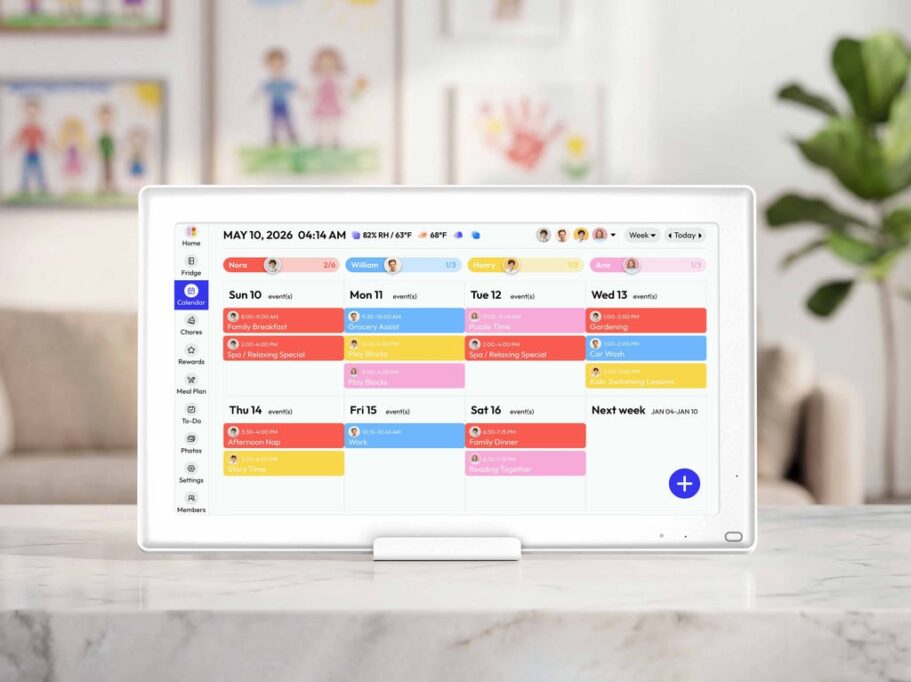
Beyond scheduling, a well-built command center incorporates the practical details families reach for constantly: emergency contacts, after-school pickup instructions, and recurring reminders for things like medication or garbage day. Some families add a digital sticky note section for quick messages — the kind of communication that currently gets lost in text threads or left on paper scraps. Smart displays like the Echo Show 15 support widgets that bring all of this together on one screen, while tablet-based setups can use apps like Notion, Cozi, or Everblog to build custom dashboards that consolidate schedules, meal plans, and household notes in one place. The goal is reducing the number of places anyone has to look to get the information they need. When the command center is genuinely comprehensive, it shifts the household from reactive to proactive — conflicts get spotted before they happen, responsibilities are clear, and the mental load of keeping everything running gets distributed more evenly across the whole family.
From Chaos to Calm: Making the Digital Calendar Work for Your Family
The chaotic family morning doesn’t have to be the norm. A large digital calendar, positioned where everyone can see it, fundamentally changes how a household communicates and coordinates. Instead of scattered sticky notes, buried text messages, and last-minute dinner scrambles, your family gets a single source of truth — one that updates in real time, connects to meal planning apps, and keeps every member, including the kids, genuinely informed.
The steps outlined here are designed to be practical, not overwhelming. Start with the right hardware and a reliable app, configure it together as a family, and build the Sunday planning habit that keeps everything current. Layer in meal planning templates and automated grocery reminders, and then expand outward into a full family command center that handles chores, school events, and important contacts alongside the daily schedule.
The payoff isn’t just saved time — it’s reduced mental load, fewer conflicts, and evenings that feel manageable rather than reactive. Technology works best when it solves real problems, and for busy families, this one does exactly that. Take the first step this weekend, and you may be surprised how quickly a calmer, more connected household routine becomes your new normal.