Ever taken one great photo and wished you could see it reimagined a dozen different ways — different outfits, different settings, different vibes — without setting up a dozen separate shoots? That’s a common creative bottleneck, and it’s exactly the kind of problem an AI image generator is built to solve, letting you generate multiple styled variations from a single source image in a fraction of the time.
Dreamina, powered by its most advanced image generation model, Seedream 5.0 Pro, makes this kind of variation genuinely effortless. Whether you’re a content creator experimenting with different aesthetics or a brand testing multiple looks for a campaign, one image can become a whole library of options. Let’s walk through exactly how it works.
Why one image, many looks, actually matters
Creating variety used to mean multiple outfit changes, multiple locations, and multiple shoots — all of which cost time and money. Being able to take a single base image and reimagine it in different styles removes that entire barrier. It means creators, marketers, and everyday users can experiment freely, testing what resonates without committing to a full production every time they want to try something new.
Understanding what “one image, many looks” really means
At its core, this approach uses a single reference image as your anchor point, then applies different prompts to reshape the styling, setting, or mood while keeping the core subject recognizable. Instead of generating a completely new character or scene each time, you’re essentially remixing the same foundation:
- Swapping outfits or clothing styles
- Changing the background or setting
- Adjusting lighting and overall mood
- Applying different artistic or photographic styles
This keeps your output cohesive while still giving you real creative range.
Meet Seedream 5.0 Pro: Dreamina’s variation-ready image model
Seedream 5.0 Pro is particularly well-suited to this kind of work, since it was built with control and flexibility as core priorities rather than an afterthought.
Its pinpoint precision editing lets you work with point selection, lasso tools, sketch guidance, and regional controls, so you can adjust specific elements like clothing or background without disturbing the rest of the image.
Its multi-layer visual control takes things further by separating subjects, backgrounds, and effects into independent components, meaning you can swap out a setting or outfit while keeping your subject completely untouched.
On top of that, its deep reasoning generation analyzes your prompt’s intent and visual relationships before creating each variation, which helps maintain a consistent core identity even as the styling around it changes.
And with support for 14 languages, it’s just as usable for creators building multilingual content as it is for anyone working in a single market.
The role of reference images in generating variations
A strong reference image is the backbone of this whole process. The clearer and more detailed your original image, the better Dreamina can preserve key features — like face, pose, or body shape — while reimagining everything else around it. Skipping the reference image and relying purely on text descriptions makes it harder to maintain that thread of consistency across your different looks.
Your 3-step remix routine with Dreamina
Ready to turn one image into many? Here’s the process, start to finish.
Step 1: Write a text prompt and/or add a reference image
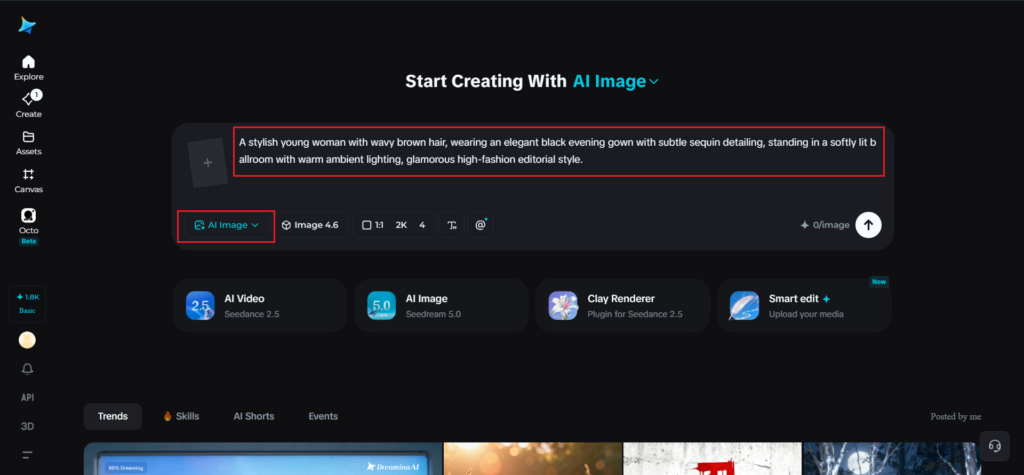
Navigate to Dreamina and begin by writing a detailed text prompt describing a person dressed appropriately for the look or style you’re going for. Upload a reference image of the person or subject you want to base your variations on, so Dreamina has a clear visual anchor to work from.
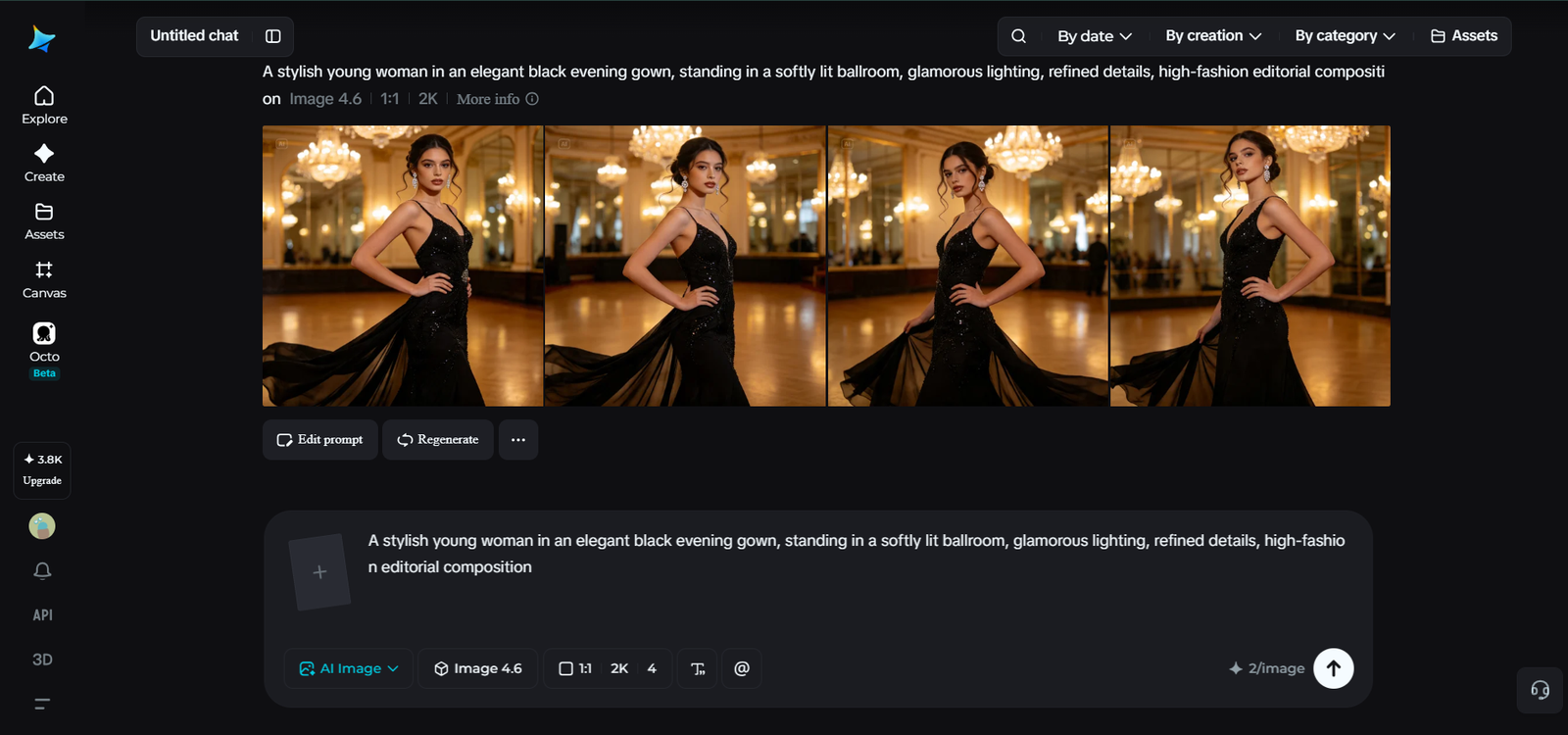
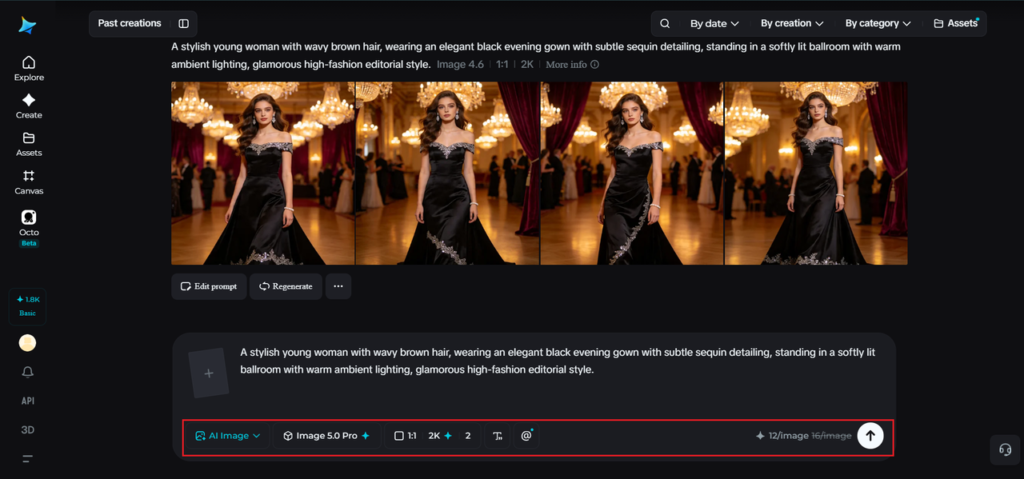
A sample prompt here might read: A stylish young woman with wavy brown hair, wearing an elegant black evening gown with subtle sequin detailing, standing in a softly lit ballroom with warm ambient lighting, glamorous high-fashion editorial style.
The more precisely you describe the styling and setting, the more distinct and polished each variation will turn out.
Step 2: Adjust parameters and generate
Once your prompt and reference image are ready, fine-tune your generation settings. Select Image 5.0 Pro by Seedream 5.0 Pro, as your model, then choose your preferred aspect ratio, image size, and resolution, going with 1K for faster experimentation or 2K when you’re ready for a polished, final-quality result. When everything’s set, click Dreamina’s generate icon to create your styled variation.
Step 3: Customize and download
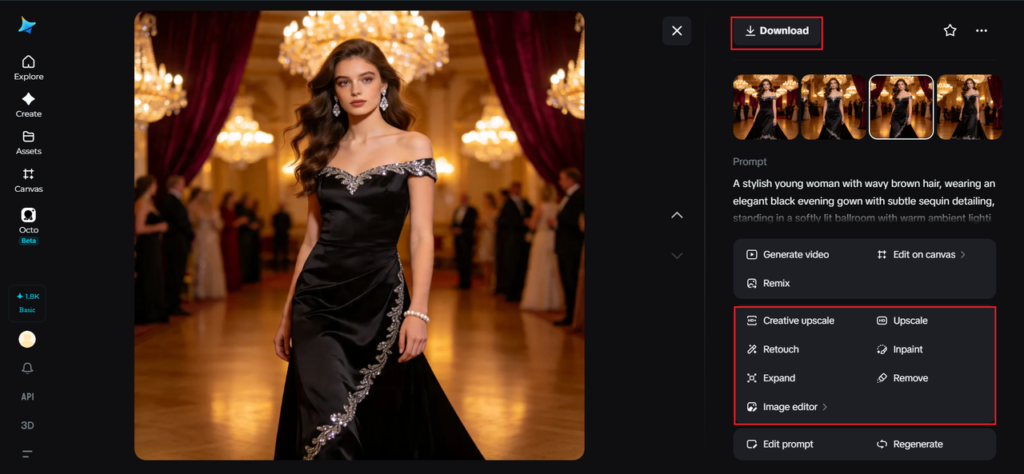
After generating your image, use Dreamina’s AI customization tools to fine-tune the details — inpaint to fix small imperfections, expand to widen the scene, remove to eliminate distracting elements, and retouch to sharpen textures and lighting. Once you’re happy with how it looks, click the Download icon to save your finished variation.
Mixing up settings and moods without losing identity
One of the most fun parts of this process is exploring how dramatically a mood can shift while the subject stays recognizable. Try:
- Moving the same subject from a bright outdoor setting to moody indoor lighting
- Switching from a formal look to something casual or streetwear-inspired
- Testing different color palettes to see how they affect overall tone
Where multiple looks from one image come in handy
This technique isn’t just a fun experiment — it has genuine practical applications across creative and commercial work:
- Fashion and lifestyle content with multiple styled shots
- Social media campaigns needing varied visuals from one shoot
- Character design exploration for games or storytelling
- A/B testing different looks for marketing creative
Common pitfalls when generating multiple looks
A few habits can undermine your results if you’re not careful:
- Using a low-quality or unclear reference image
- Changing too many elements in a single prompt, which can distort the subject
- Neglecting to keep lighting and angle reasonably consistent across variations
- Forgetting to review each output before moving on to the next look
Avoiding these keeps your set of variations looking intentional rather than scattered.
Final thoughts
Turning one image into a whole range of styled variations used to require serious time and resources — now it just takes a clear reference image, a thoughtful prompt, and the right AI image generator.
With Dreamina and its advanced Seedream 5.0 Pro model, you get the precision editing, layer control, and reasoning power needed to keep your subject consistent while exploring endless creative directions.
Start with one strong image, and let Dreamina help you build a whole world of looks around it.