The line between home office and gaming station has never been blurrier. As remote work becomes the norm, many gamers find themselves needing a single desk that handles spreadsheets by day and epic raids by night. One of the most consequential decisions in building this dual-purpose space is choosing between a corner gaming desk and a standard gaming desk. It might seem like a simple matter of shape, but this choice ripples through every aspect of your setup—from how efficiently you use your room’s square footage to how comfortably you sit during marathon sessions, and even how well your monitors, keyboard, and other peripherals integrate into a cohesive workstation. The wrong pick can leave you cramped, hunched, or constantly fighting tangled cables. This article walks you through the defining characteristics of each desk type, weighs their strengths and weaknesses for real-world gaming scenarios, explores ergonomic considerations, and provides a practical decision framework so you can confidently select the desk that fits both your space and your play style.
Understanding Corner and Standard Gaming Desks
A corner gaming desk follows an L-shaped design that tucks neatly into the junction of two walls. The two wings of the desk extend along adjacent walls, creating a wraparound surface that places everything within arm’s reach. This layout naturally divides your workspace into zones—one side for your primary gaming setup and the other for work tasks, streaming equipment, or additional monitors. Corner gaming desks typically range from 50 to 70 inches along each wing, offering generous total surface area while occupying floor space that would otherwise go unused.
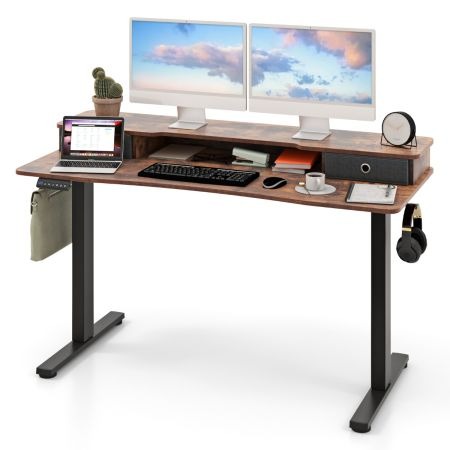
A standard gaming desk, by contrast, is a rectangular surface that sits flat against a single wall or floats freely in a room. These desks generally span 45 to 65 inches wide and 24 to 30 inches deep, providing a straightforward platform for your gaming rig. The design is intentionally simple: a flat plane with legs, sometimes enhanced with a raised shelf for monitors or built-in cable grommets. Standard desks work well in rooms of almost any layout because they don’t depend on a corner placement to function properly.
The fundamental difference between these two types comes down to how they interact with your room’s geometry. A corner desk exploits dead space and wraps your peripherals around you, which suits multi-monitor gamers and those who need distinct work and play zones on the same surface. A standard gaming desk keeps everything in a linear arrangement, making it easier to position anywhere—against a wall, in the center of a room, or even facing a window. Understanding these structural distinctions is the first step toward determining which configuration will serve your daily workflow and evening gaming sessions most effectively.
Evaluating Pros and Cons for Your Gaming Needs
Choosing between a corner and standard gaming desk ultimately depends on how you game, what equipment you use, and how your room is configured. Both options carry distinct advantages that cater to different priorities, and understanding these trade-offs will prevent buyer’s remorse down the road.
Corner Gaming Desks: Maximizing Immersion and Space
Corner gaming desks excel at creating an immersive cockpit-like experience. The wraparound surface places your monitors at a natural viewing angle, reducing the need to crane your neck when glancing between screens. This layout also reclaims otherwise wasted corner space, making it ideal for smaller rooms where every square foot matters. For gamers who double as content creators or streamers, the extra wing provides a dedicated area for a camera, mixer, or secondary laptop without encroaching on the primary gaming setup. However, corner desks come with limitations. They demand a specific room configuration—you need two adjacent walls free of doors, windows, or radiators. Moving them is cumbersome, and accessing cables or components tucked into the corner junction can be frustrating. If your room layout changes, a corner desk offers far less flexibility in repositioning.
Standard Gaming Desks: Simplicity and Flexibility
A standard gaming desk wins on versatility. Its rectangular footprint fits against any wall, in the middle of a room, or even perpendicular to a wall as a room divider. Setup is straightforward—no need to align two wings or worry about uneven wall lengths. Peripheral management stays simple because everything sits in a single linear plane, making it easy to reach USB ports, adjust your keyboard tray, or swap out components. Standard desks also tend to be lighter and easier to relocate when you rearrange your space. The downside is that a standard desk consumes more usable wall length for the same surface area a corner desk provides. Gamers running triple-monitor arrays or extensive peripheral collections may find themselves running out of room quickly, forcing compromises in their gaming desk arrangement.
Ergonomics and Peripheral Support in Gaming Desks
Comfort during extended gaming or work sessions isn’t a luxury—it’s a necessity that directly affects your performance and long-term health. Ergonomic gaming desks address this by incorporating design elements that keep your body in a neutral, strain-free position throughout hours of use. Whether you opt for a corner or standard layout, the ergonomic principles remain the same: your eyes should sit level with the top third of your monitor, your forearms should rest parallel to the floor, and your feet should plant flat on the ground. The desk itself plays a central role in making these positions achievable. Beyond body mechanics, your desk must also accommodate the sprawl of modern gaming peripherals—multiple monitors, mechanical keyboards, mice with large pads, headsets, stream decks, and the inevitable tangle of cables connecting everything. A desk that forces you to compromise on ergonomics to fit your gear defeats its own purpose.
Key Ergonomic Features for Gaming Desks
Height adjustability tops the list of ergonomic must-haves. A desk that lets you fine-tune its height—or better yet, alternate between sitting and standing—accommodates different chair heights and body proportions without forcing awkward postures. Desk depth matters equally; anything shallower than 24 inches pushes monitors too close to your eyes, causing eye strain and limiting keyboard placement options. Surface material also contributes to comfort—a smooth matte finish reduces wrist friction during mouse movements, while a slightly textured surface prevents items from sliding. Rounded or beveled front edges eliminate pressure points on your forearms during long typing or gaming stretches. Finally, a sturdy frame that eliminates wobble keeps your monitors stable and your focus unbroken during intense gameplay moments.
Step-by-Step Guide to Supporting Multiple Monitors and Peripherals
Start by measuring your desk surface and mapping out where each peripheral will live, leaving at least six inches of clear space in front of your keyboard for wrist rest and mouse movement. Next, mount your monitors on adjustable arms clamped to the desk’s rear edge—this frees up surface area beneath the screens and lets you position each display at the perfect height and angle. Route all cables through desk grommets or adhesive cable channels along the underside of the desk, grouping power cables separately from data cables to reduce electromagnetic interference. Position your headset on a hook mounted to the desk’s side, keeping it accessible without consuming desktop real estate. Finally, use a small USB hub mounted beneath the desk surface so you can plug in controllers, charging cables, or flash drives without reaching behind your tower every time.
Making the Right Choice: A Practical Decision Guide
Selecting between a corner and standard gaming desk comes down to four core factors that, when evaluated honestly, point clearly toward one option. Start with your room’s dimensions and layout. Measure the available space, noting where doors swing, windows sit, and outlets live. If you have a free corner with at least five feet of clear wall on each side, a corner gaming desk becomes a strong contender. If your room is narrow or your only open wall is a single stretch, a standard gaming desk will serve you better without forcing an awkward fit.
Next, assess your gaming habits and equipment inventory. Count your monitors, list your peripherals, and consider whether you stream or handle work tasks at the same surface. Gamers running dual or triple monitors alongside a stream deck, mixer, and secondary laptop will benefit from the zoned real estate a corner desk provides. Those with a single ultrawide and a clean, minimal setup will find a standard desk more than sufficient. Then factor in your future needs—if you plan to expand your rig within the next year or two, choose the desk that accommodates growth without requiring a complete replacement. Retailers like Costway-AU offer both corner and standard home office desks in a variety of sizes, making it easier to find an option that matches your current setup and anticipated upgrades.
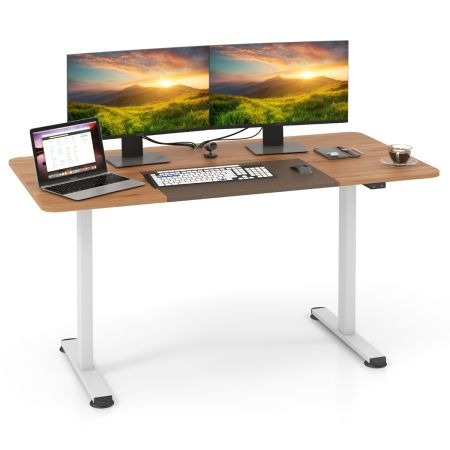
Finally, weigh flexibility against specialization. Ask yourself how often you rearrange furniture or whether you might move to a different room or apartment. A standard desk adapts to change effortlessly, while a corner desk commits you to a specific configuration. Run through this quick checklist before purchasing: room measurements confirmed, peripheral layout sketched, growth plans considered, and repositioning likelihood assessed. When your answers align predominantly with one desk type, trust that conclusion—your daily comfort and gaming performance depend on making the choice that matches your real-world constraints rather than an idealized setup you saw online.
Selecting the Gaming Desk That Fits Your Space and Play Style
The decision between a corner and standard gaming desk shapes your daily experience more than most people anticipate. Corner gaming desks deliver expansive surface area, natural multi-monitor positioning, and dedicated zones that keep work and play separate on a single platform—all while reclaiming space that typically goes unused. Standard gaming desks counter with unmatched placement flexibility, simpler setup, and the freedom to rearrange your room without being locked into a fixed configuration. Regardless of which shape you choose, prioritizing ergonomic features like proper height, adequate depth, and stable construction ensures that long sessions remain comfortable rather than punishing. Equally important is planning your peripheral layout in advance—mounting monitors on arms, routing cables cleanly, and reserving enough open surface for natural mouse movement. Apply the decision framework outlined here: measure your room honestly, inventory your gear, project your future needs, and assess how likely you are to reconfigure your space. When you let these real-world constraints guide your choice instead of aesthetics alone, you end up with a gaming desk that enhances both productivity and play for years to come.