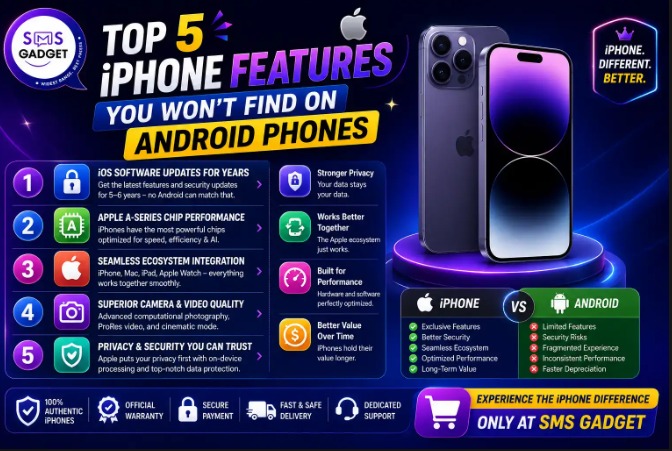
If you’ve ever wondered what truly sets the iPhone apart from Android beyond its design and logo, the answer lies in a handful of exclusive features that have become central to the Apple experience. While Android offers greater customization and a wider range of devices, some iPhone capabilities remain uniquely integrated and difficult to replicate consistently across the Android ecosystem.
From smooth communication tools to increased privacy and security measures, the iPhone’s unique characteristics will continue to provide it a significant advantage in 2026.
iPhone Features That Make Apple’s Ecosystem Hard to Replace
An iPhone is more than just a smartphone, it acts as the hub of a connected ecosystem that links your devices, apps, and services into one unified experience. Whether you’re sharing files, switching between devices, or protecting your personal data, Apple’s ecosystem is designed to make everyday tasks simpler and more seamless.
The following features highlight why many users continue to prefer the iPhone and why Apple’s ecosystem remains one of the company’s biggest competitive strengths.
1. iMessage and FaceTime’s Seamless, Encrypted Ecosystem
iMessage isn’t just a messaging app—it’s a fully integrated system that works identically across iPhone, iPad, and Mac, with end-to-end encryption built in by default. Messages sync instantly across every Apple device you own, support high-quality media sharing without compression, and let you edit or unsend messages within a short window. FaceTime works the same way, with the added ability to share your screen, watch content together through SharePlay, and even let Android or Windows users join a FaceTime call through a browser link—without ever needing the app themselves.
Why Android Can’t Match It
Android relies on RCS (Rich Communication Services) for similar functionality, and while RCS has closed some of the gap, it depends on carrier and manufacturer support varying by brand and region—there’s no single, unified system that works identically across every Android device the way iMessage does across every Apple device.
2. AirDrop
AirDrop lets you share photos, videos, files, and even entire apps instantly between Apple devices, using a direct peer-to-peer connection over Bluetooth and Wi-Fi — no internet connection, no uploading to the cloud, and no size limits to worry about. It works seamlessly between iPhone, iPad, and Mac with zero setup beyond turning it on.
Why Android Can’t Match It
Android has alternatives like Nearby Share, but it isn’t universally supported across every manufacturer’s skin in the same consistent way, and it doesn’t extend across as wide a range of device types — like syncing directly with a laptop — as smoothly as AirDrop does within Apple’s ecosystem.
3. Deep Apple Ecosystem Integration (Handoff, Universal Clipboard & AirPods)
If you own an iPhone alongside a Mac, iPad, or AirPods, the integration goes far beyond basic Bluetooth pairing. Handoff lets you start an email on your iPhone and finish it instantly on your Mac. Universal Clipboard lets you copy text or an image on one device and paste it directly on another. AirPods automatically switch between your iPhone, iPad, and Mac depending on which device you’re actively using, with no manual reconnecting required.
Why Android Can’t Match It
Android ecosystem integration exists in pockets — for example, between a Samsung phone and a Samsung tablet — but it isn’t consistent across brands. A Pixel phone, a Lenovo laptop, and a pair of generic earbuds simply weren’t designed to work together as one connected system, the way Apple devices are.
4. Satellite SOS and Emergency Features
iPhones (from iPhone 14 onward) can connect directly to satellites when you’re outside of cellular and Wi-Fi range, allowing you to send an emergency SOS message, share your location with rescue services, or even message friends and family in areas with zero signal. Combined with Crash Detection, which can automatically alert emergency services if you’re in a severe car accident and unresponsive, this turns the iPhone into a genuine safety tool in situations where a regular phone would be completely useless.
Why Android Can’t Match It
A small number of flagship Android phones have begun experimenting with satellite messaging, but the feature isn’t standardized across the Android ecosystem the way it is across every modern iPhone — most Android users simply don’t have access to it at all.
5. App Tracking Transparency and Privacy Controls
Apple’s App Tracking Transparency forces every app to explicitly ask for your permission before it’s allowed to track your activity across other apps and websites for advertising purposes—and you can deny that permission with one tap. Combined with Apple’s App Store “privacy nutrition labels,” which disclose exactly what data an app collects before you even download it, the iPhone gives users a level of transparency and control over their personal data that’s baked into the operating system itself.
Why Android Can’t Match It
Android apps can request similar permissions, but there’s no OS-wide, standardized system forcing every single app to ask before cross-app tracking — leaving privacy protection far more fragmented and inconsistent across the Android ecosystem.
Ready to Switch? Find a Trusted iPhone mobile Shop and Make It Official
If these ecosystem features have convinced you to make the switch, where you buy matters just as much as which model you choose. Always purchase from a trusted, authorized iPhone mobile shop that provides a proper warranty card, VAT invoice, and verified IMEI—this protects you from grey-market units that may lack official support down the line. Comparing prices across a couple of trusted sellers before buying also ensures you’re not overpaying for the same model.
Frequently Asked Questions
What are the top features that only the iPhone has that Android doesn’t?
The most notable ones are iMessage/FaceTime’s encrypted ecosystem, AirDrop, deep Apple device integration (Handoff, Universal Clipboard, and AirPods auto-switching), Satellite SOS emergency features, and App Tracking Transparency privacy controls.
Does any Android phone have AirDrop?
Android has similar tools like Nearby Share, but no Android device offers the same seamless, cross-device experience as AirDrop within Apple’s ecosystem.
Can Android phones use satellite SOS like iPhone?
A few newer flagship Android phones have started testing satellite messaging, but it isn’t a standard feature across the Android ecosystem the way it is on modern iPhones.
Why is iMessage exclusive to iPhones?
iMessage is Apple’s proprietary messaging protocol, built specifically for the Apple ecosystem. While RCS has improved cross-platform messaging, it doesn’t offer the same unified, encrypted experience iMessage provides across Apple devices.
Is it worth switching to iPhone just for these features?
It depends on your existing devices and habits. If you already own a Mac, iPad, or AirPods, the ecosystem integration alone can make daily use significantly smoother,which is a major reason many buyers stick with iPhone long-term.
Final Thoughts
These five features highlight why iPhone’s appeal goes beyond just hardware specs—it’s the tightly controlled software ecosystem that creates an experience Android, with its many manufacturers and varying skins, simply can’t replicate in the same consistent way. If you’re considering making the switch, it’s worth comparing the current iPhone Price across a few sources first and buying from a trusted, authorized iPhone mobile shop to make sure you get a genuine device with full warranty support.