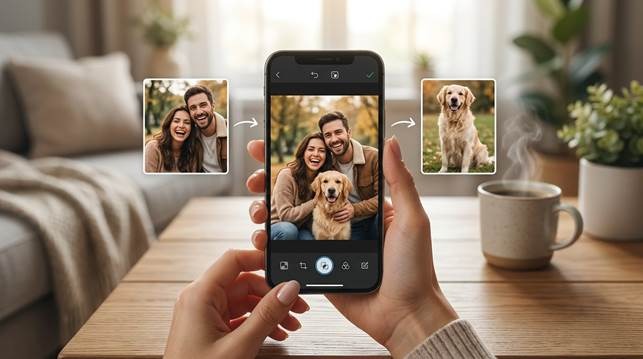
If you have ever wanted to put two separate photos into one image, you already know the problem is usually not the idea. The problem is the result. A lot of merged images look stiff, pasted, or obviously fake. You may want to place two people in one frame, create a tribute image from separate portraits, or combine a pet photo with a favorite picture of its owner. The emotional reason is often clear. The hard part is making the image feel natural.
That is why combine tools keep getting attention. You do not want a basic collage when the photo means something to you. You want one picture that feels connected, balanced, and ready to keep. If the image is for an anniversary, a family memory, a pet album, or a simple social post, the difference between a quick paste job and a polished combined photo matters more than most people expect.
Part 1. Why people want to combine photos in the first place
Sometimes the reason is simple. You never got the two people into the same frame, but you still want one image that brings them together. Sometimes the reason is more emotional. You may want to create a remembrance photo, a keepsake, or a tribute that feels respectful and complete. In other cases, the goal is fun. You may want to merge two images for a pet post, a couple edit, or a personal story that feels more polished than a normal collage.
In all of these situations, the need is not just technical. You are trying to make a picture say something more than either photo could say alone. That is why the final image has to feel smooth and intentional. If it looks clumsy, the meaning of the photo gets weaker instead of stronger.
Part 2. Why so many merged images still look unnatural
Most people run into the same problems. The subjects do not line up well. The spacing feels off. The lighting looks mismatched. One image feels sharper than the other. The result ends up looking more like two unrelated files sitting beside each other than one finished picture. This is especially frustrating when the image matters emotionally, because the bad merge becomes the first thing you notice.
That is also why AI combine tools are useful when they are built well. You do not want to spend time learning complicated editing software just to make one memory image or one romantic photo. You want the app to help with composition, visual balance, and the feeling that both subjects belong in the same frame.
Part 3. Why Relumi fits this workflow so well
When you look at Relumi, the main strength is how it frames the task. The goal is not only to place two files together. The goal is to create one image that feels more meaningful, more balanced, and easier to keep.
That matters when you want to combine photos for a reason that feels personal. The app is built around couple memories, tribute images, pet and owner edits, and other situations where the final result needs to feel smoother than a normal collage.
It also helps if your goal is to merge two images without learning complex editing software. The app takes on more of the composition work so the result can look cleaner and more natural on mobile.
Why Relumi feels more useful than a simple collage app
The biggest difference is emotional quality. A normal collage app can place images next to each other, but that does not always create a photo you actually want to keep. When the goal is a romantic memory, a heartfelt tribute, or a polished social image, you want the final result to feel connected rather than assembled.
Part 4. How to combine two photos in Relumi
If you want a simple mobile process, the official combine photo guide shows a workflow that is much easier to follow than manual editing. You start by choosing the two images, let the app process them, review the result, and save the finished version once it feels right.
Step 1. Choose the photos you want to combine
This first step matters because a merged image only works when both photos deserve to be part of the same story. You may be trying to bring two people into one frame, create a tribute image, or make a pet photo feel more personal and complete.
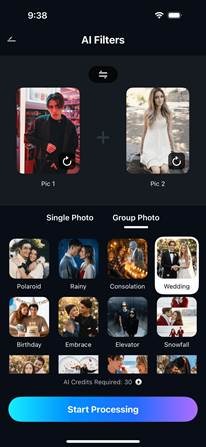
Step 2. Start the combine photo process on mobile
Once you choose the images, the app begins the hard part for you. This is useful because most people do not want to line up faces, fix spacing, or manage composition by hand on a phone screen.
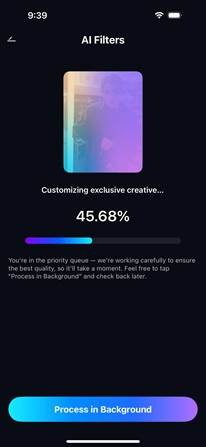
Step 3. Review the merged result
A good combined image should feel like one picture, not two photos forced together. This review step helps you see whether the final image feels balanced, respectful, and natural enough to save.
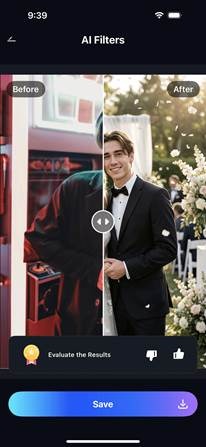
Step 4. Save the combined photo and share it
When the result looks right, saving is the easy part. What matters more is that the final image now feels ready for a message, an album, a tribute post, or a private memory you wanted to make feel complete.
Part 5. The kinds of photo combinations you care about most
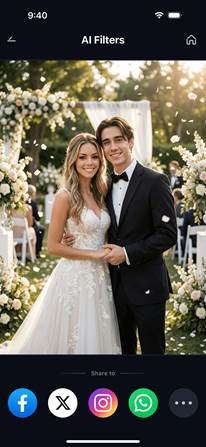
Couple photos are one of the most common examples. You may have two separate portraits from different moments but still want one image that feels warm and natural. That is where a stronger merge can help, because the goal is not only to place two people together. The goal is to make the shared photo feel believable.
Memory and tribute images are another important use case. When the photo carries emotional weight, you do not want the result to feel harsh or careless. You want something soft, respectful, and visually calm. That is why the quality of the merge matters so much in these cases.
Pet and owner photos also work well in this format. Sometimes the best photos of each subject exist separately, and combining them is the easiest way to create one image worth saving. Even a playful result feels stronger when the layout looks clean and the spacing feels natural.
Quick comparison: what makes a combined image feel worth keeping
| What you want to make | What often goes wrong | What helps it look better |
| A couple photo | The image looks pasted together | Balanced placement and smoother composition |
| A memory or tribute image | The result feels awkward or harsh | A softer and more respectful blend |
| A pet and owner photo | Spacing looks random | A cleaner layout that feels intentional |
| A social post or keepsake | The photo looks like a basic collage | A more polished merged image |
When those details come together, the photo stops feeling like an edit and starts feeling like a finished picture. That is the point where people stop thinking about the tool and start caring about the image itself.
Conclusion
If you want to combine photos in a way that feels natural, the real goal is not just placing two images side by side. The real goal is making one complete picture that carries the right emotion. That is why better AI tools feel more useful than basic collage apps.
For anyone trying to merge two images into one without learning advanced editing, Relumi offers a more practical path. It helps you combine photos for romance, memory, tribute, pets, and personal storytelling in a way that feels easier, cleaner, and more worth sharing.