You’ve got the new iPhone 17.
It’s sleek. It’s powerful. It looks… exactly like everyone else’s.
Same finish. Same camera bump. Same polished glass back you’re almost afraid to set down on a table.
Here’s the good news: you don’t need a bulky case to stand out. With the right iPhone 17 skins, you can turn your device into something that actually feels like yours—without adding weight or hiding its design.
Let’s talk creative.
1. Go Bold With Statement Textures
Minimalism is fine.
But sometimes you want your phone to say something.
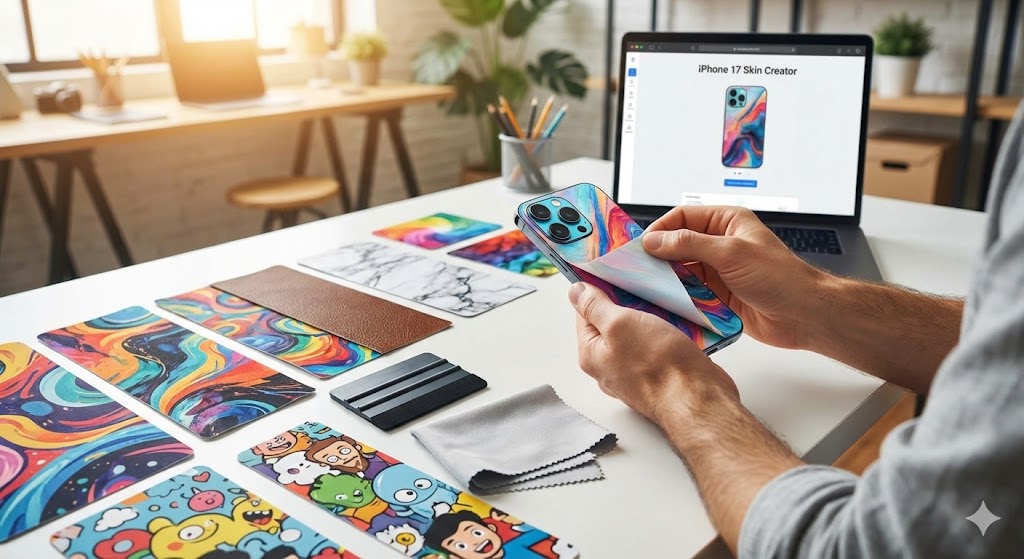
Carbon fiber patterns, brushed metal finishes, matte neon wraps, or even faux leather textures instantly transform the feel of your iPhone 17. Textured skins don’t just change the look—they change the tactile experience.
It’s subtle. Until someone asks, “Wait… what is that?”
And unlike cases, skins keep the phone’s slim profile intact.
2. Embrace Artistic and Abstract Designs
Your phone is the device you touch more than anything else.
Why not treat it like a canvas?
Abstract paint splashes, marble finishes, watercolor gradients, glitch art, galaxy prints—art-inspired iPhone 17 skins give your device personality without looking overdone.
It’s a small detail. But small details define style.
For design inspiration and customization options, check out this collection of iPhone 17 skins that range from bold graphics to refined finishes.
Your phone doesn’t have to look corporate.
3. Keep It Clean With Matte Neutrals
Not everyone wants loud patterns.
Sometimes personalization means elevated simplicity.
Matte black. Stone gray. Soft beige. Deep navy. These finishes give your iPhone 17 a refined, understated aesthetic—almost like a limited-edition release Apple never made.
Bonus: matte skins reduce fingerprints and glare.
Clean look. Practical benefit. Zero bulk.
4. Show Off With Clear Accent Skins
Here’s a clever move: combine transparency with detail.
Some users prefer subtle customization—like accent skins that highlight just the camera area or frame edges while leaving the rest exposed.
It’s personalization without commitment. A nod to style rather than a full transformation.
Think of it as tailoring instead of redesigning.
5. Go Seasonal (Yes, Really)
Your wardrobe changes with the seasons.
Why not your phone?
Bright florals for spring. Neon or tropical themes for summer. Earth tones for fall. Sleek metallics or icy patterns for winter.
One of the biggest advantages of iPhone 17 skins is flexibility. You’re not locked into a single aesthetic for the life of your device.
Swap it out. Refresh your look. Keep things interesting.
6. Match Your Setup
Your phone doesn’t exist in isolation.
Maybe you’ve curated a specific desk aesthetic—minimalist workspace, RGB gaming setup, warm wood tones, or monochrome tech.
Choose a skin that complements your laptop, tablet, headphones, or smartwatch.
When everything aligns visually, it feels intentional.
And yes, people notice.
7. Add Grip Without Bulk
Let’s be honest—modern smartphones are slippery.
Skins with textured finishes add subtle grip without adding thickness. You keep the slim feel of the iPhone 17 while reducing the heart-stopping moment when it slides toward the edge of the table.
Personalization and practicality can coexist.
8. Create a Custom Identity
Some people want more than patterns—they want personalization.
Custom graphics, initials, logos, or niche designs let you turn your phone into an extension of your identity.
It’s not about showing off.
It’s about owning something that feels uniquely yours.
Final Thoughts
Your iPhone 17 is powerful by default. But visually? It’s a blank slate.
With the right iPhone 17 skins, you don’t just protect your device—you redefine it. You add texture. Personality. Mood.
And the best part? No bulk. No heavy case. No compromise on design.
Just a phone that finally looks like it belongs to you.