Finding the right background track often consumes hours of video editing time. Navigating copyright claims adds another layer of complexity to the creative process. Musick AI provides a direct solution for generating custom, royalty-free audio tailored to specific video needs.
By utilizing the AI Music Generator, creators can transform simple text descriptions into high-quality soundtracks. The process requires no formal audio engineering experience. Just describe the desired mood or genre, and the system delivers a complete composition. This ensures every video project receives an original audio backdrop without copyright concerns.
I. Understanding the Core Features
- Text-to-Music Generation
The main interface relies on text prompts to produce original audio. Users simply describe the desired style, such as an acoustic pop track about the holidays. The system processes genres and vibes rather than specific artist names to create unique, emotionally rich compositions.
- Vocal Gender Selection
Audio tracks can feature different vocal characteristics to match the video’s tone. Creators select from male, female, or random vocal options before generating the track. This flexibility helps synchronize the vocal style with the specific visual narrative of the video.
- Instrumental Options
Not every visual sequence requires singing. The generator includes a dedicated instrumental mode to create songs completely without lyrics. These pure melody tracks serve perfectly as subtle background audio for tutorials, cinematic drone shots, or dialogue-heavy scenes.
II. Exploring Available Genres and Styles
- Popular Modern Beats
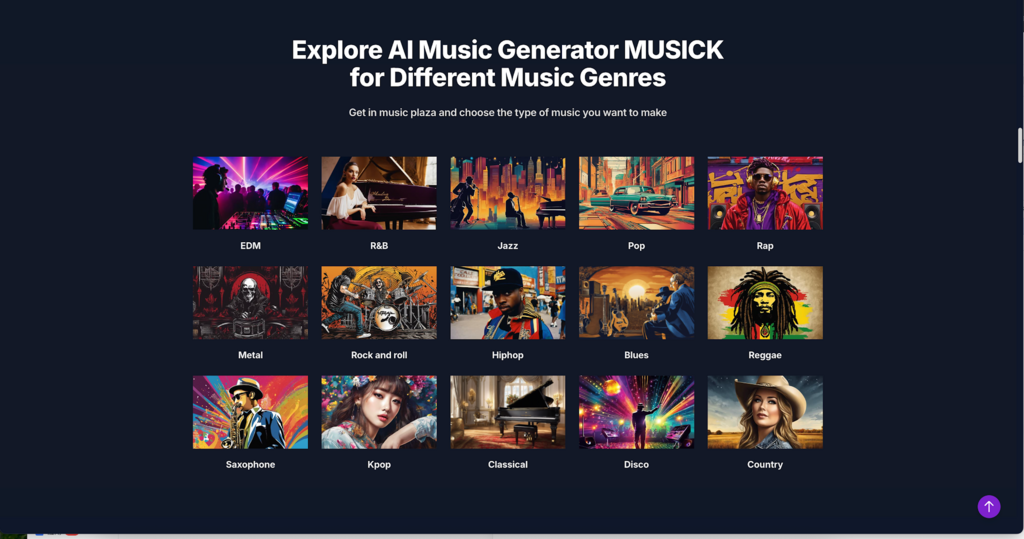
The system supports contemporary styles necessary for trendy video content. Creators can select from EDM, Pop, R&B, and Hip-hop. These energetic styles work exceptionally well for fashion montages, lifestyle vlogs, and energetic social media updates.
- Classic and Acoustic Vibes
For more sophisticated or relaxed video content, traditional genres are fully supported. Options include Jazz, Blues, Classical, and Country. Integrating custom AI Music in these styles adds a polished, professional feel to corporate presentations or nature documentaries.
- High-Energy and Specialized Tracks
Some video projects demand highly specific auditory environments. The available selections span Rock, Metal, Reggae, Kpop, Disco, and even Saxophone-focused tracks. This wide span of composition styles easily handles complex harmonies for any niche video requirement.
III. Practical Applications for Creators
- Social Media Content
Short-form videos require immediate auditory engagement to prevent scrolling. An AI Music Maker helps generate catchy, fifteen to thirty-second loops designed to hold viewer attention. These customized clips fit seamlessly into Instagram, YouTube, Facebook, LinkedIn, and Twitter feeds.
- Commercial Video Production
Corporate videos necessitate safe, royalty-free assets. Audio generated through the system includes a commercial license, ensuring strict adherence to copyright laws. Product managers and filmmakers can integrate the audio into advertisements without fearing intellectual property disputes.
- Education and Entertainment
Custom audio stretches beyond standard marketing. High school musical students and teachers can craft unique pieces for educational projects. Additionally, users can build song formulas simply for entertainment, downloading tracks immediately to share with friends.
IV. Additional Creation Tools Available
- Smart Lyrics Generation
Beyond pure audio generation, the suite features an AI Song Lyrics Generator. Users input their desired music genres, and the tool creates corresponding free music notes and lyrical content. This function supports musicians seeking structural inspiration for vocal tracks.
- Beat Production Capabilities
For those needing precise rhythmic control, the AI Beat Producer offers specialized functionality. Creators can write down specific melody notes directly within the interface. This assists in structuring the exact pacing required for the video’s background beat.
- Dedicated Rap Generation
Urban music styles require distinct formatting and rhythm structures. The AI Rap Generator allows users to design music sheets or entire playlists centered around the rap genre. An AI Song Maker equipped with this specific tool streamlines the production of heavy-bass compositions.
V. Best Practices for Optimal Results
- Crafting Descriptive Prompts
The quality of the final audio depends heavily on the input instructions. Detail the idea in the prompt box using clear musical terms. Mention the specific mood, preferred instruments like bright synths or dynamic percussion, and exact tempos like 120 BPM.
- Selecting the Right Model
The system offers multiple processing models, specifically v1.0 and v2.0. Testing the identical prompt across both versions often yields different creative interpretations. Experimenting with these distinct models helps isolate the exact sound texture needed for the project.
- Managing the Mood Templates
The generator provides various mood templates tailored to specific brand needs. Align the selected mood directly with the visual emotion of the video scene. An uplifting pop track suits a feel-good summer montage, while a darker tone fits suspenseful footage perfectly.
Conclusion
Matching high-quality audio to visual content remains essential for professional video production. Musick AI removes the traditional barriers of copyright claims and tedious stock music searches. By utilizing detailed prompts and adjusting vocal or instrumental settings, creators gain precise control over their video soundtracks. Implementing these customized audio solutions ensures that every visual project features a legally safe, emotionally resonant, and perfectly synchronized musical backdrop.